
Conceptual visualisation · not an analysis result
Lemmata · LDA Topic Modeling · v0.3.0
A corpus, read by the words it repeats.
Topic modeling (LDA) groups the words that recur together across a body of text. Lemmata keeps every choice and limit in view, so the topics you read are the topics you can defend.
Launch Lemmata Read the method noteSkip to the summary
Open source
A topic is a distribution over words, not a theme.
LDA gathers words that tend to co-occur. Reading a topic as a theme is your interpretation, made explicit and open to revision, not a fact the model discovered.
The number of topics is a choice, not a discovery.
You set the number of topics; the model does not find a true count. Compare several values rather than trusting one, and report the setting you chose.
Coherence is a signal, not a verdict.
Coherence (C_v) measures how often a topic's words co-occur, not whether a topic is meaningful for your question. Read it as a prompt to inspect the topics qualitatively.
Preprocessing shapes what you see.
Which tokens are kept, removed, or lemmatized changes the topics. Lemmata shows each token's part of speech, its lemma, and whether it was kept, so you can inspect the preprocessing choices behind a result.
Topics describe this corpus, not language in general.
Results hold for the documented corpus under these settings. They are a description to interpret, not a claim about authors, periods, or meaning beyond the texts you analysed.
Scroll · the topics emerge
Lemmata · LDA Topic Modeling · v0.3.0
A corpus, read by the words it repeats.
Topic modeling (LDA) groups the words that recur together across a body of text. Lemmata keeps every choice and limit in view, so the topics you read are the topics you can defend.
Open source
A topic is a distribution over words, not a theme.
LDA gathers words that tend to co-occur. Reading a topic as a theme is your interpretation, made explicit and open to revision, not a fact the model discovered.
The number of topics is a choice, not a discovery.
You set the number of topics; the model does not find a true count. Compare several values rather than trusting one, and report the setting you chose.
Coherence is a signal, not a verdict.
Coherence (C_v) measures how often a topic's words co-occur, not whether a topic is meaningful for your question. Read it as a prompt to inspect the topics qualitatively.
Preprocessing shapes what you see.
Which tokens are kept, removed, or lemmatized changes the topics. Lemmata shows each token's part of speech, its lemma, and whether it was kept, so you can inspect the preprocessing choices behind a result.
Topics describe this corpus, not language in general.
Results hold for the documented corpus under these settings. They are a description to interpret, not a claim about authors, periods, or meaning beyond the texts you analysed.
The method, in plain terms
What LDA does
Latent Dirichlet Allocation treats each document as a mixture of topics and each topic as a distribution over words. It surfaces sets of words that recur together; it does not read meaning, and it does not know which grouping matters for your question.
Choosing the number of topics
The number of topics is a parameter you set. There is no single correct value; different counts foreground different structure. Compare several, inspect the words, and report the setting you used, along with the random seed and preprocessing.
What stays visible
Lemmata shows a token-level preprocessing table (tokens kept, removed, lemmatized), reports coherence as a signal rather than a verdict, and fixes the random seed for reproducibility. Results describe the documented corpus under the chosen settings, not language in general.
Three ways to read a corpus
- Topics across a corpus
Surface the recurring topics in a body of texts and interpret them yourself.
In the app - Follow topics across documents
See how topic weights change across the order of your documents, with file boundaries marked.
In the app - Export your results
Tables, metrics, the preprocessing summary and the environment report in one archive, with a separate PDF report.
In the app
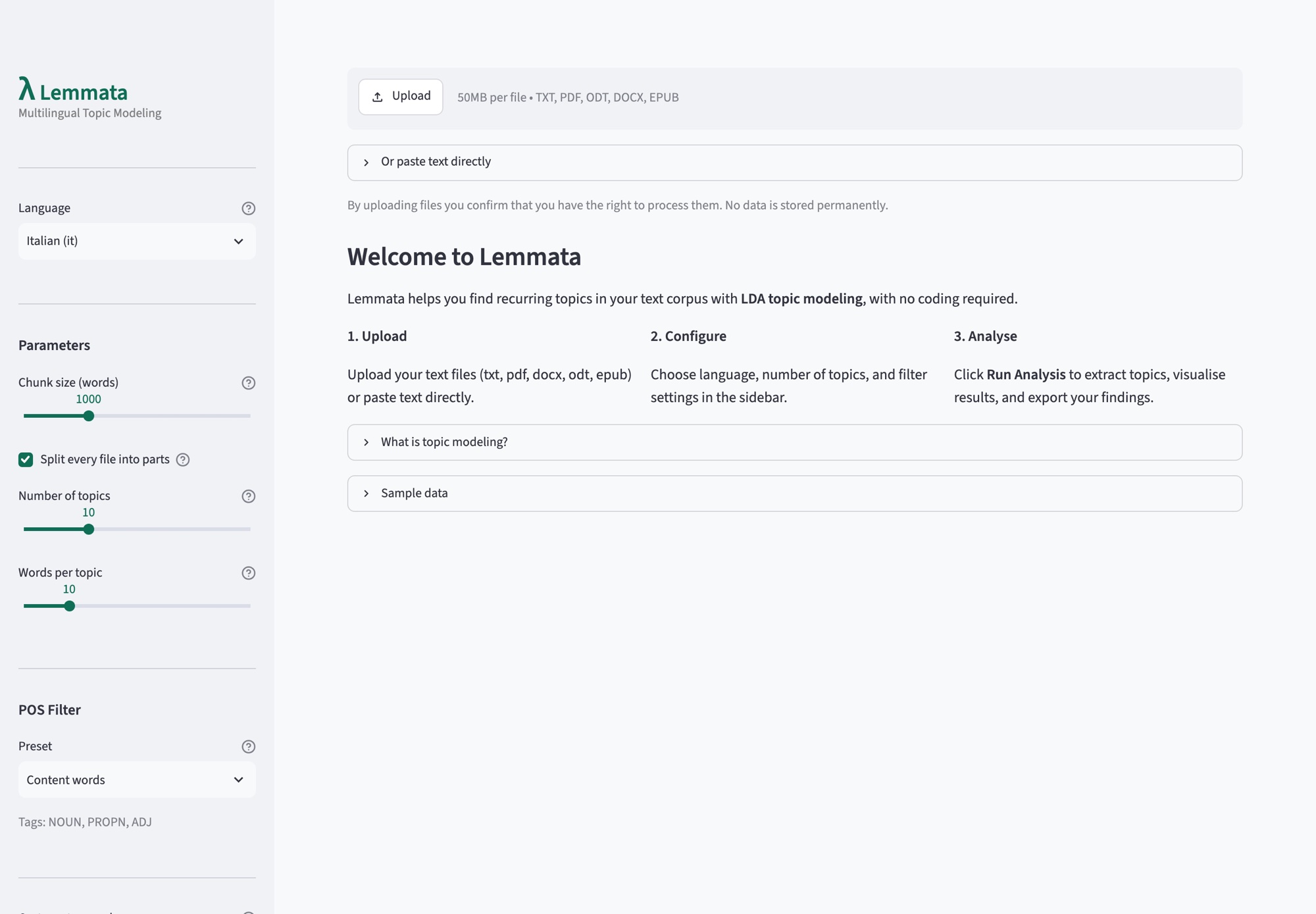
The actual instrument. Settings, not scripts: every parameter visible and recorded in the environment report.
Built for researchers who work with texts, not terminals.
Rigorous topic modeling for literary scholars, historians, and digital humanists, with the method kept in full view.
Upload your corpus, choose your settings, and run LDA from your web browser with nothing to install. The analysis runs on the server that hosts the app. Rigorous analysis without writing a single line of code.
A token-level table shows which tokens were kept or removed and which lemma each one received. Preprocessing stays visible.
Built-in support for English, Italian, French, German, and Spanish, with spaCy language models and per-language stopword lists. If your texts look more like another supported language than the one you chose, a warning appears above the results. Results have been checked against a published study for Italian only.
With the same data, settings, random seed (42 by default), package and language-model versions, and processor type, every run gives identical results, so a result you cite is a result you can reproduce. Your settings, the main package versions and the processor type are recorded in an environment report, which the PDF report and the ZIP archive also contain.
CSV tables, a PDF report, a ZIP archive with the tables, metrics and environment report, and the heatmap as PNG or SVG.
Coherence (C_v) is reported alongside the topics, framed as a signal to review qualitatively, never as a verdict.
Gibbs sampling, the method of MALLET, is the default, with MALLET's main default settings. The faster variational method, the only one before v0.3.0, can still be chosen. Other changes in v0.3.0 also affect results, so to reproduce an earlier result exactly, use the release that produced it. Earlier releases are archived on Zenodo.
"Check topic stability" fits the same model 9 more times with the seeds that follow yours and shows, for each topic, in how many of the 10 runs (yours included) a topic sharing at least 5 of its top 9 words appears (Agrawal, Fu and Menzies 2018). "Compare numbers of topics" plots coherence (C_v) for 2 to 15 topics and leaves the choice to you.
Three steps from corpus to insight.
Defaults get you started fast. You can change the analysis settings in the interface, and your choices are recorded in the environment report.
Drag and drop your text files (TXT, PDF, DOCX, ODT, EPUB) or paste text directly. With several long files, each file is split into parts of about the chunk size by default. Untick "Split every file into parts" to keep one document per file. Your data is processed in session and not stored permanently. To try it first, use the three Svevo novels in the examples folder of the source code (Italian, public domain).
Choose the language, number of topics, chunk size, part-of-speech filters, and stopwords. Sensible defaults are ready the moment you land.
Explore the interactive topic map, topic charts and heatmap, together with topic distributions and word clouds. Download the tables and records as one ZIP archive, and the report as a PDF.
Cite Lemmata
Using Lemmata in your research?
@software{koran_lemmata_2026,
  author = {Koran, Oğuz and Yücesan, Barış and Cangır, Hakan},
  title  = {Lemmata: A Multilingual LDA Topic Modeling Platform for Digital Humanities},
  year   = {2026},
  doi    = {10.5281/zenodo.19391729},
  url    = {https://lda.lemmata.app}
}
DOI · 10.5281/zenodo.19391729 · Source code
Bring your corpus. Name the topics yourself.
Launch Lemmata Back to Lemmata
Open source · MIT